Personal project · 07
One Voice
Isolate a voice from overlapping speech, transcribe it, and edit the audio by selecting words. Export the finished clip with matching text and subtitles.
Two microphones, one selected voice. Explore the recording desk, then hear real extractions below. All portfolio information is available in the page text.
Edit the words. Keep the voice.
In the full app, isolate and transcribe your recording, select words to remove or keep, then listen and download an edited WAV with matching text and subtitles. Explore the prepared examples below.
One conversation. Either voice.
Six conversations · two voices each
Explore saved model outputs: listen to the overlapping voices, choose who to keep, then switch to the extraction.
Best full validation · epoch 80 · used for live processing
A separate recording identifies the speaker. It is not the clean answer.
Switch tracks while playing to compare the same moment. Playback levels are matched; no extra denoising is applied.
Training progress
Snapshot · September 29, 2026
Paused after 81 of 100 planned epochs. The saved run can resume. Live processing uses the best full-validation checkpoint, from epoch 80.
- Best full validation · 6,000 requests
- 11.78 dB
- Latest full validation · epoch 81
- 11.75 dB
- Best progress monitor · 400 requests
- 11.84 dB
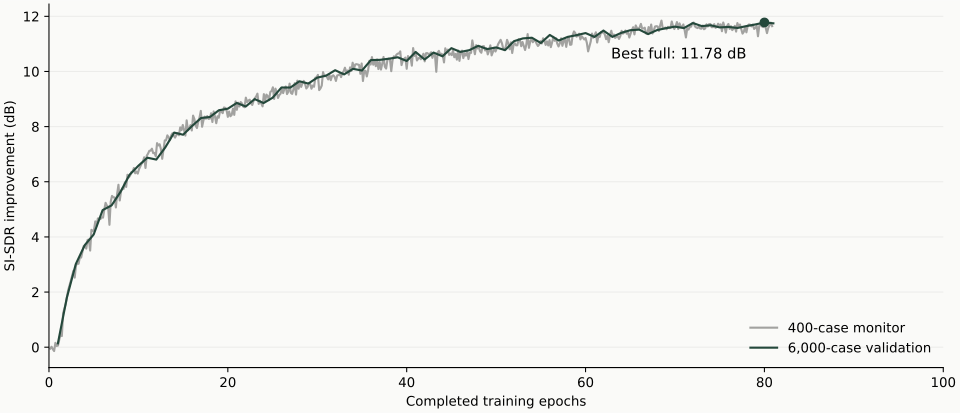
The 400-request monitor and full validation are different suites. The latest saved model is at update 281,484, nine updates after the last full validation. Its listening examples are current; that exact checkpoint has no full-suite score.
Training used 13,900 Libri2Mix mixtures and 251 speakers. Both listening versions use the same six conversations, chosen independently of their scores.
Download training resultsBeyond the average
Explore all 6,000 validation requests—not just the twelve listening examples. These graphs compare epoch 80 with the last full evaluation at epoch 81.
The spread behind the average
The best model’s median is 13.38 dB. The weakest 10% of requests score 7.26 dB or less; 302 of 6,000 requests (5.0%) do not improve over the original mixture.
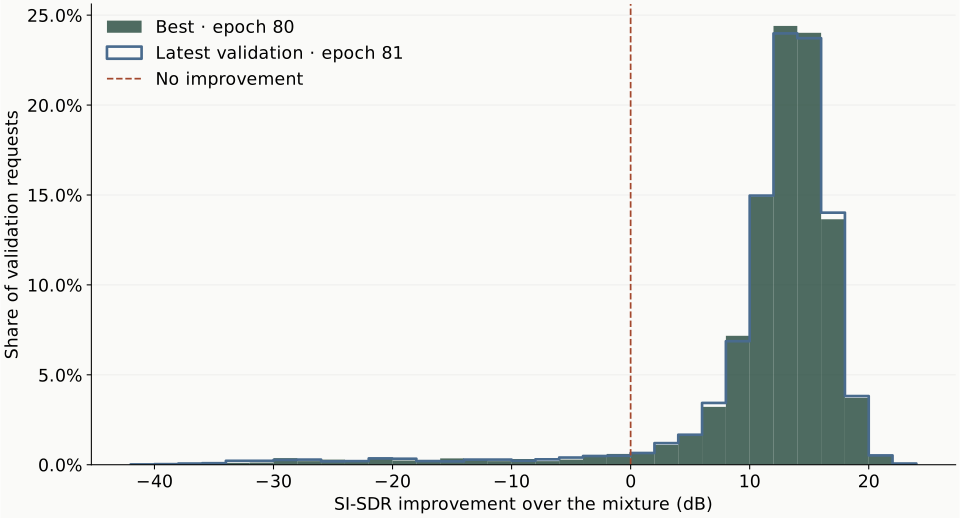
Scroll within the graph to see all axes, or download it at full size.
Development results used to select the model. They measure separation, not word accuracy or a listening-quality rating. Epoch 81 was evaluated at update 281,475; the latest saved model at update 281,484 has not had this full evaluation.
A sample tells One Voice who to keep.
Use a separate recording of the person speaking alone. One Voice uses that voice sample to extract their speech from an overlapping conversation. It does not clone voices or generate new speech.
Results can contain distortion or other speakers, especially with noise or unfamiliar recording conditions. Listen to the output before relying on it.
Examples: LibriSpeech / Libri2Mix, OpenSLR, CC BY 4.0. Audio has been mixed and model-processed.
Research behind One Voice
One Voice is an independent implementation informed by published target speaker extraction research. Its reference-conditioned model draws on Junjie Li and colleagues’ On the effectiveness of enrollment speech augmentation for Target Speaker Extraction (2024), with a smaller configuration for local training. It does not reproduce the paper’s full experiments or reported results.
The separator follows ideas from Yi Luo and Jianwei Yu’s Music Source Separation with Band-split RNN (2022). SpeakerBeam and SpEx informed the target-speaker formulation and speaker supervision. No pretrained weights from these systems are used.
Thanks to the researchers and the LibriSpeech and LibriMix dataset contributors. Full sources and attribution ↗
The work
From overlapping voices to an edited clip
The product
One Voice turns an overlapping conversation into an isolated voice, a transcript, and an editable audio clip. Upload or record audio in the full application, provide a separate reference of the person to keep, then review and edit their speech.
The listening experience
Six prepared conversations let visitors choose either voice and switch between the mixture and extracted speech at the same playback position. Each includes a separate voice reference, a clean target for comparison, and downloadable model output.
Speech to text
My One Voice model separates the speaker before pretrained speech recognition. The pipeline uses Silero for speech detection, SpeechBrain ECAPA for voice matching, and faster-whisper for transcription. A reference identifies the desired speaker without retraining the model.
Twelve prepared runs compare transcription before and after isolation. Voice-matching checks produce a selected-voice transcript while leaving uncertain regions visible for review. Visitors can follow timestamped playback, inspect the matching evidence, and export audio, text, subtitles, or the report.
Editing through the transcript
The full app guides editing through three steps: select words, make an edit, then listen and download. Remove a passage or keep only a selection, audition the original words, and compare the edited result. Restore, undo, redo, and reset preserve the original recording.
One edit plan drives WAV, text, and SRT exports. Cuts follow word timestamps, use short boundary fades, and retime subtitles to match the retained speech. Editing runs in the browser without another model call. Word boundaries are estimates, so listening back remains part of the workflow.
Training and results
The full-data run started from random weights using 13,900 Libri2Mix mixtures and 251 training speakers. It is paused and resumable after 81 of 100 planned epochs; the schedule was not completed. Full development validation improved from 10.51 dB at the previous published epoch-39 checkpoint to 11.78 dB at epoch 80, which is selected for live processing. Epoch 81 scored 11.75 dB on the same 6,000 requests from 40 unseen development speakers.
The smaller 400-request monitor peaked at 11.84 dB at update 238,000. It is a separate suite, not the full-validation score. These SI-SDR improvements measure separation against clean targets, not transcription accuracy or an untouched test set. Best/latest audio and the validation chart make the plateau visible. The latest saved checkpoint is nine updates beyond epoch 81 and has no full-suite score at that exact step.
The system
I built the PyTorch extraction model, bounded extraction service, queued transcription worker, and browser audio editor. The full app supports uploads, microphone recording, and explicitly saved local voice references. This portfolio presents saved model outputs; new recordings and editing are available through the linked application.
Limitations
Other voices and distortion can remain, and conservative voice matching can exclude correct words. The prepared examples show actual outputs from a frozen evaluated checkpoint; viewing them does not run new inference.