Multiscale curved strokes
Painterly rendering
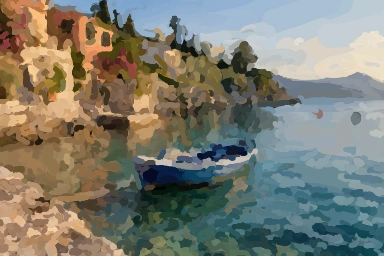
Repaint a photograph with curved strokes, starting with broad shapes and returning for smaller details.
Try it
Runs locally in your browser. Uploaded images stay on your device.
Run a painting, then replay its strokes in the order they were laid down.
Ready when you are.
Worker processing · local inputs · downloadable output
How it works
Run a painting, then replay its strokes in the order they were laid down.
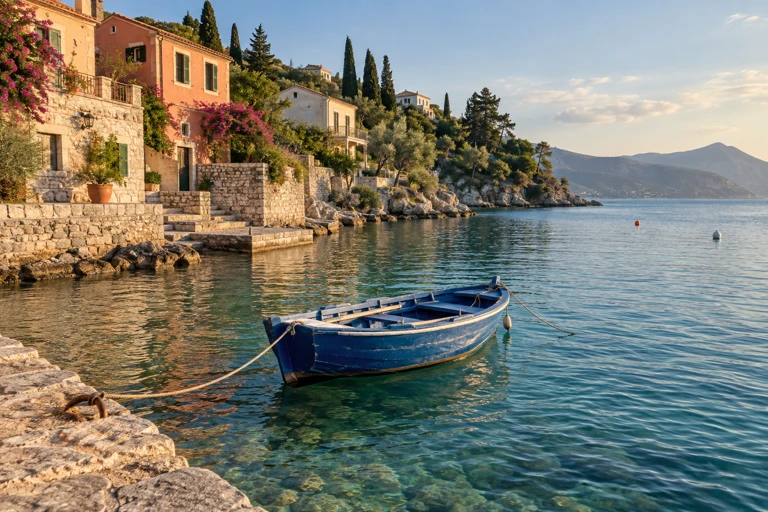
Each brush stroke gets its color from the harbor photograph and bends along its local contours. Broad passes establish the scene, then smaller strokes add detail. This renderer constructs strokes directly from one image; Image Analogies instead needs an example pair that demonstrates a treatment.
- Blur the reference at each brush scale.
- Find areas where the canvas differs from the reference, and seed strokes there.
- Follow image-gradient tangents to bend strokes along forms; refine with smaller brushes.
Read the original research
Aaron Hertzmann · 1998
Computed examples
Outputs from the same implementation used in the playground.
Source photographs were generated for these studies. The displayed results were computed by the algorithms; they are not generated illustrations of an expected result. Published previews are compressed for the web.
Implementation and limits
A multiscale curved-stroke study with a software rasterizer. It does not simulate wet paint, pigment, or a physical bristle brush.
Interactive settings are bounded to keep the experiment practical in a browser. Higher detail can cost more processing time without guaranteeing a better result. The implementation and its tests are available in the source repository.
The result records each stroke’s curved path, radius, color, and order. Replay rebuilds that painting from the stored strokes.